

Chart your reviews in Power BI.
A free report for Power BI that works through the Grades.com Reports API: reviews by site and month, rating trends, reply rate and time to reply, every location side by side and what AI assistants say about you.
Works with Power BI through the Reports API; not a certified connector. Power BI Desktop is free on Windows.
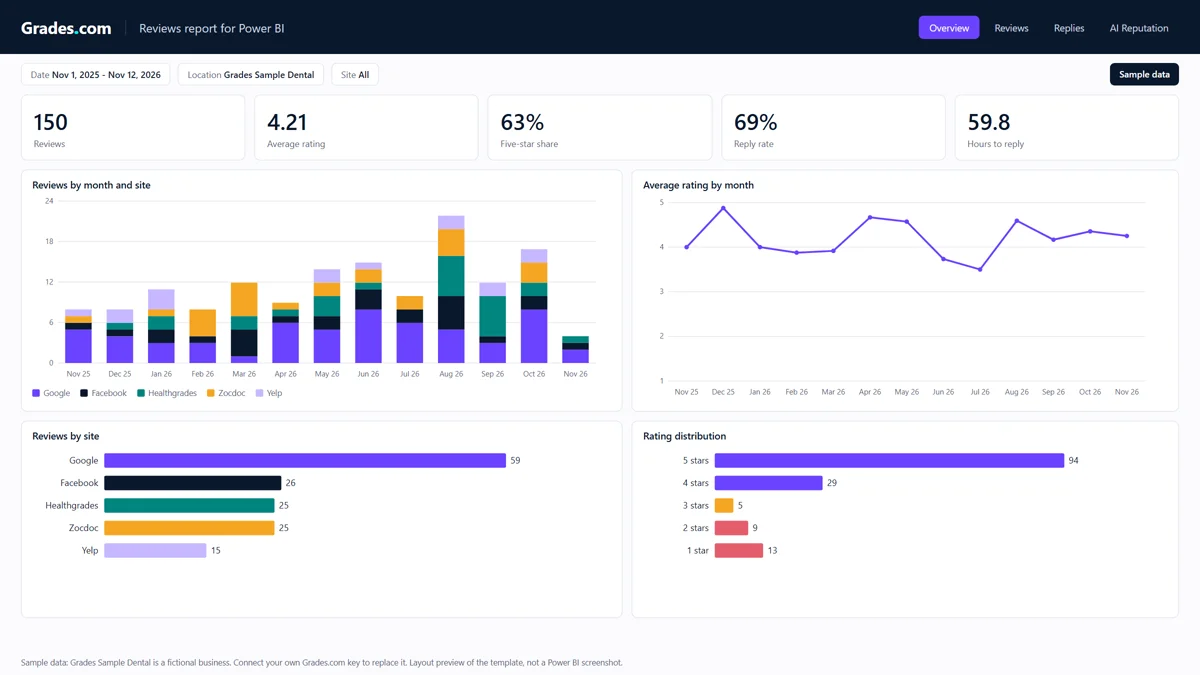
Four pages, ready to fill with your data
Overview, Reviews, Replies and AI Reputation, the same pages as our Looker Studio report. The pictures show Grades Sample Dental, a fictional business; your report shows your own reviews.
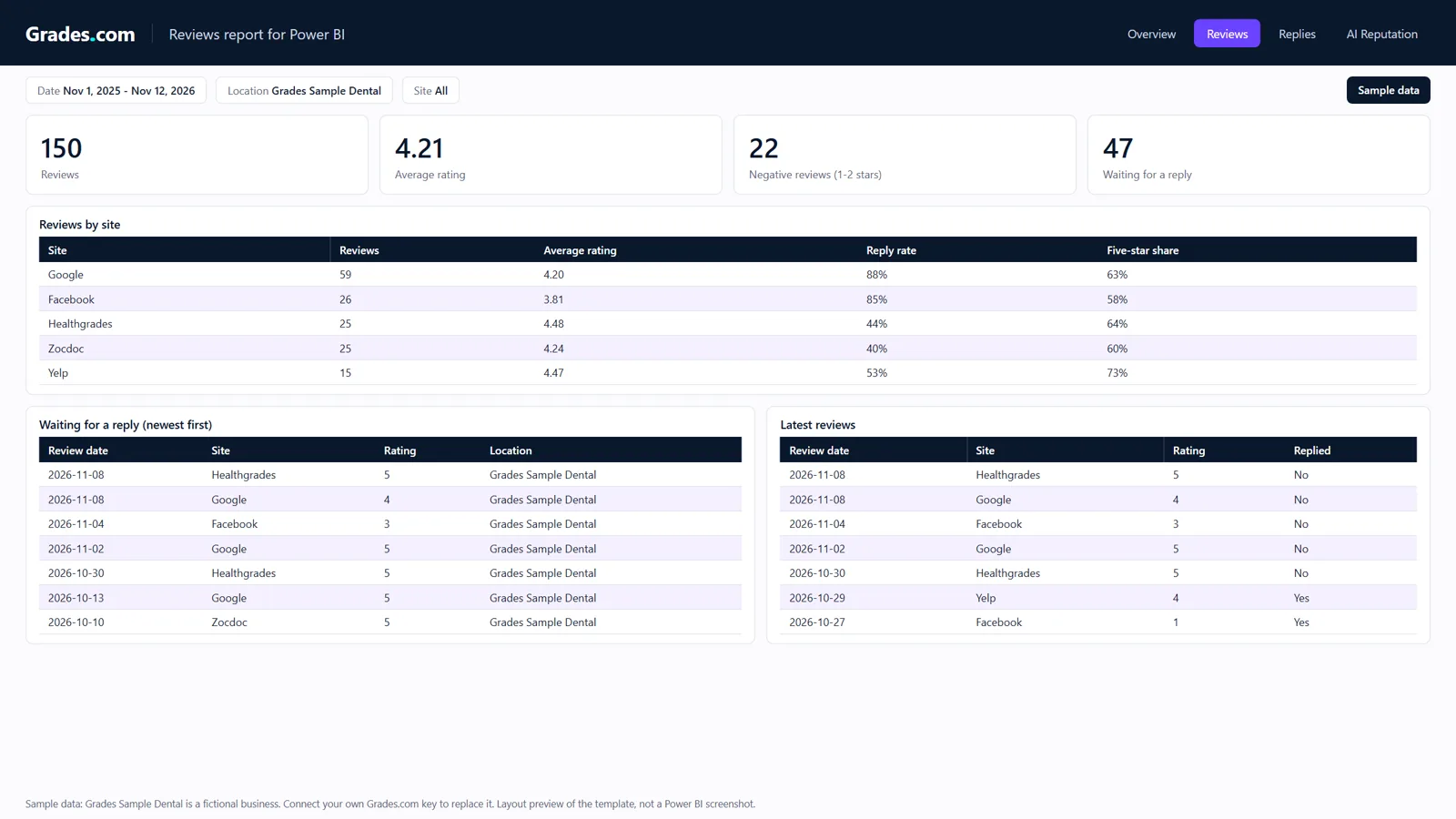
Reviews
Every site with its count, average rating, reply rate and five-star share; the reviews still waiting for a reply; the latest reviews.
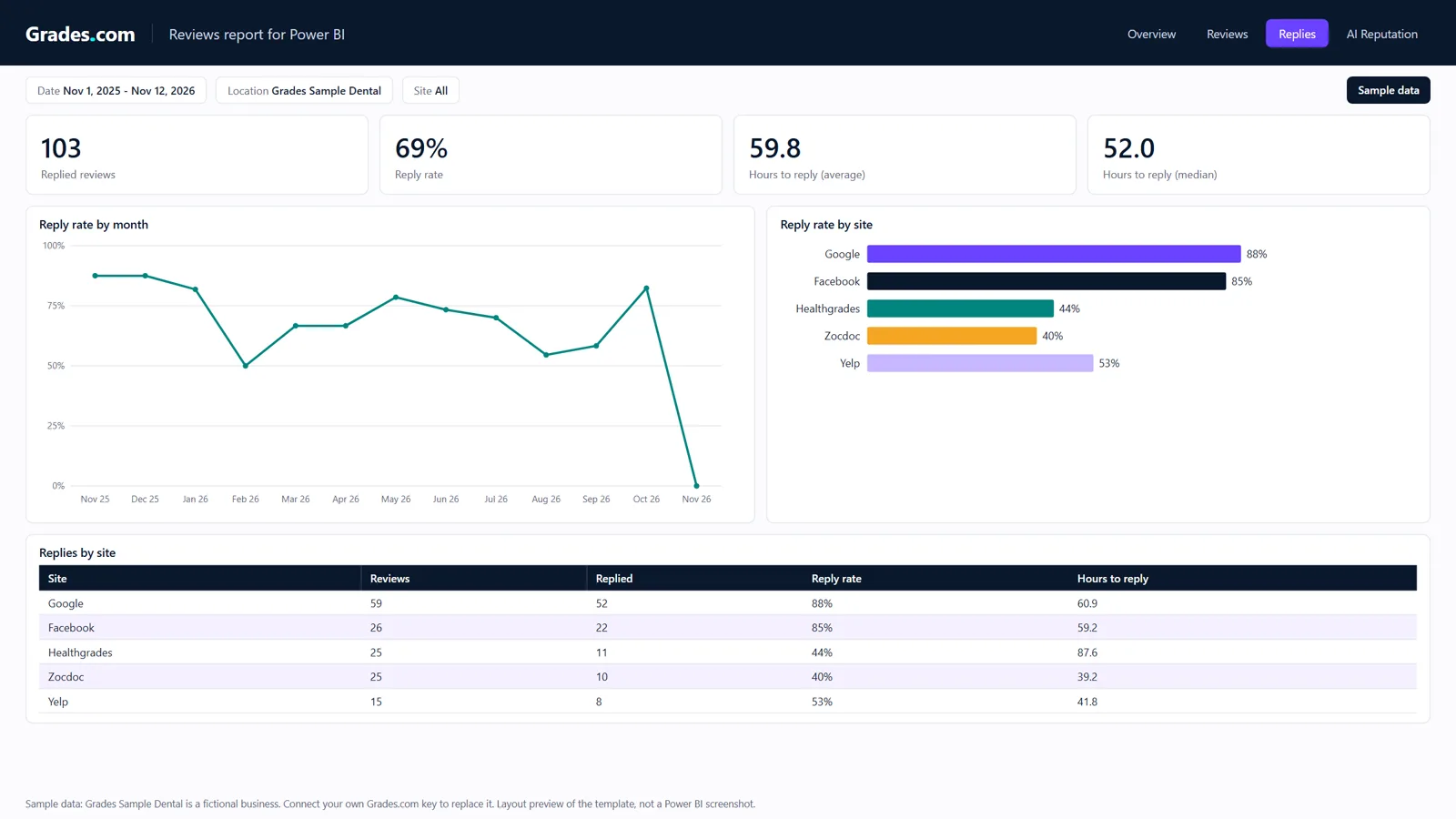
Replies
How many reviews got a reply, how fast, and which sites are falling behind.
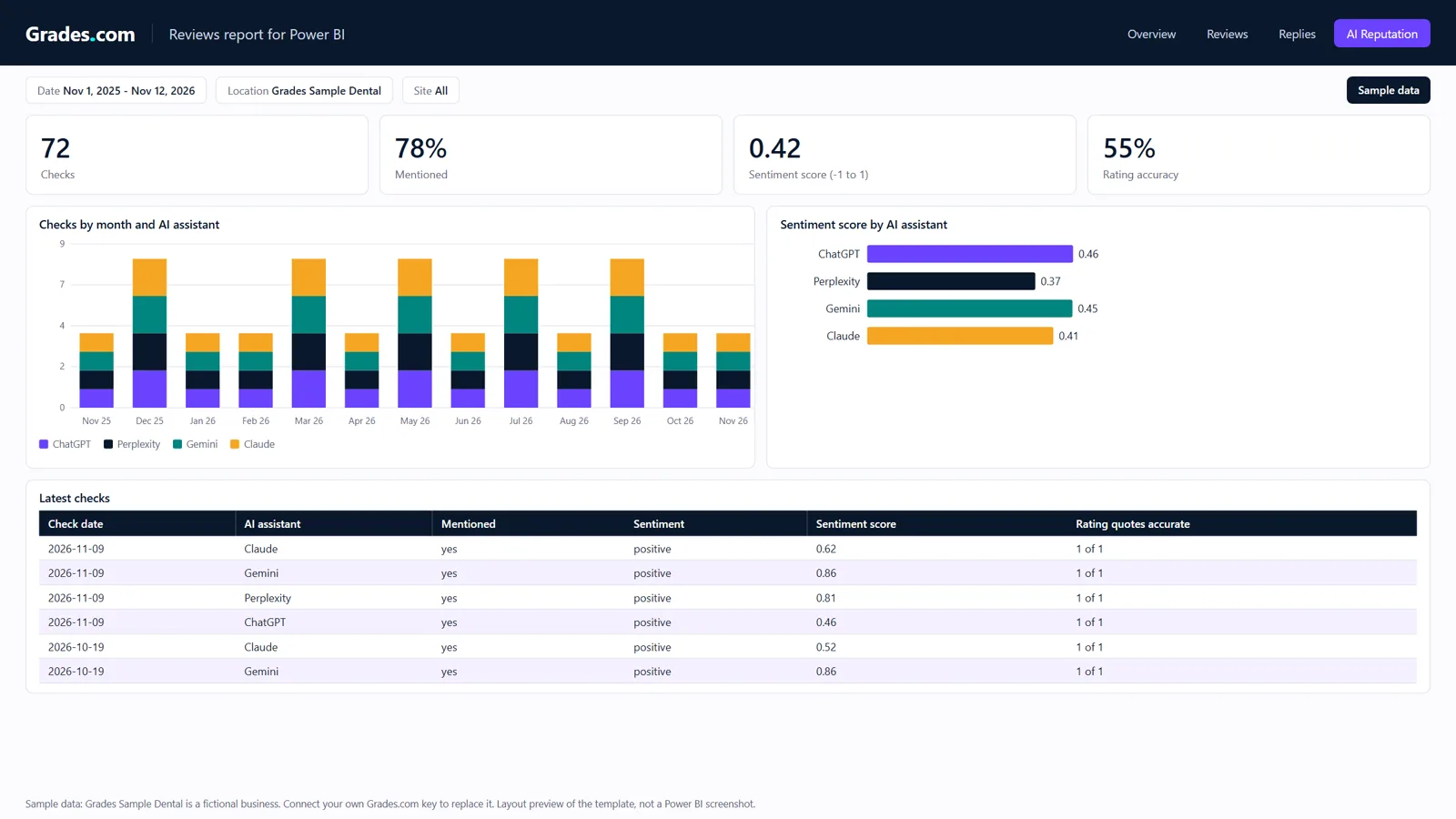
AI Reputation
Whether ChatGPT, Perplexity, Gemini and Claude mention you, the sentiment of what they say and whether the ratings they quote are right.
Needs a Grades.com account and a reporting key. The pictures are previews of the report layout with sample data.
Questions this report answers
- Are we getting more reviews than last month, and on which sites?
- Is our average rating going up or down, month by month?
- Which reviews still need a reply, and how long do replies take?
- Which location or site has the lowest reply rate?
- Do AI assistants mention us, and do they quote our rating correctly?
What it reads
- Locations: every business your key reaches, to compare them side by side.
- Reviews: one row per review with site, rating, reply and time to reply (no review text).
- Review metrics: new reviews, average rating and reply rate by month and site, with running totals.
- AI Reputation: every check of ChatGPT, Perplexity, Gemini and Claude your plan ran.
Set it up
Create a reporting key
Open Connect your AI > Reporting and BI tools in your dashboard. It creates a key that only reads (
reviews:read), for all your businesses or the ones you pick. Copy it, it is shown once.Add the queries
In Power BI Desktop, Get data > Blank query > Advanced editor, once for each query in the downloaded file, named as the file says: the parameters GradesApiKey, StartDate and Businesses, the GradesReport function, then the Locations, Reviews, ReviewMetrics and AIReputation tables.
Connect anonymously
When Power BI asks how to connect to
https://app.grades.com, choose Anonymous: the key travels in the request header, never in the address. Then Close & Apply.Make it yours
Apply the Grades.com theme (View > Themes > Browse for themes) or your own, add or change pages, and publish it to the Power BI service if your plan allows.
Your key is saved in the Power BI file as the GradesApiKey parameter: anyone who can edit the file can read it. Use a key that only reads, limited to the businesses the report needs, and revoke it in Connect your AI > API keys if the file is shared by mistake.
Refreshing
In Power BI Desktop
Click Refresh. The reports change at most hourly, so once a day is plenty.
In the Power BI service
The queries use a fixed address and pass the path and filters separately, the way Microsoft requires for scheduled refresh of a web source. In the semantic model's settings, set the credential for app.grades.com to Anonymous and tick Skip test connection. We have not tested a scheduled refresh in the service yet.
Every location in one request
An agency's clients or an HQ's locations come in one report; narrow it with the Businesses parameter.
Clear errors
A key that is refused or a business the key cannot read stops the refresh with an error that says so, instead of an empty report.
AI Reputation checks run monthly on Starter, weekly on Pro and daily on Premium; the report shows the checks your plan ran.
Included on every plan
The report is free. It reads the Reports API with a reporting key, which every plan from Starter has.
Reporting and BI →Frequently asked questions
Is this a certified Power BI connector?
No. It works with Power BI through the Grades.com Reports API: Power Query's own web source reads the reports with your key in a header. Nothing to install in Power BI.
Where is my key stored?
In your Power BI file, as the value of the GradesApiKey parameter. Anyone who can edit the file or the semantic model can read it, so use a key that only reads (reviews:read) and limit it to the businesses the report needs.
Can the Power BI service refresh it on a schedule?
The queries are written the way Microsoft requires for scheduled refresh of a web source (a fixed address, with the path and query passed separately). We have not yet tested a scheduled refresh in the Power BI service; this page will say so once we have.
Is the review text included?
No. The report charts counts, ratings, replies and AI Reputation checks without the words of the reviews.
Can it change anything in Grades.com?
No. The Reports API only reads, and the key it needs has only the reviews:read scope.
Power BI is a trademark of Microsoft Corporation. Grades.com is not affiliated with or endorsed by Microsoft.