


Who uses Yelp
Local businesses that people look up on Yelp, such as home and local services, restaurants and other businesses. Owners claim a free page on Yelp for Business to update their details, add photos and respond to reviews.
Claim your profile
- Go to Yelp for Business at biz.yelp.com/claim and search for your business name.
- If it appears, select it. If it does not, choose Add to Yelp for free.
- Create an account with your business information and an email address you check regularly.
- Verify the account with a verification code, sent by email or by a text or call to the phone number listed on the page.
- Yelp notes that a claimed page may be shown as unclaimed if the owner has not logged in to Yelp for Business in the last 90 days.
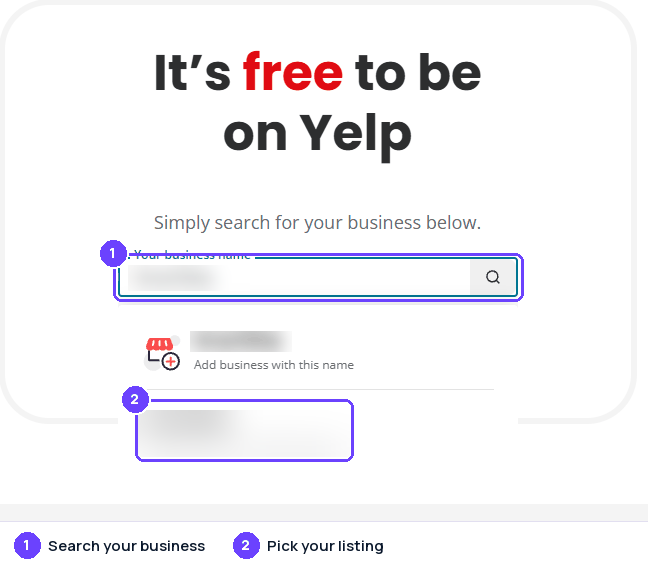
Step 1Search your business name; pick the listing with your address, or add it. Captured October 28, 2026
Captured on October 28, 2026; the site's screens may have changed since. Names of other people and businesses are blurred.
Replying to reviews
The business page must be claimed, and the profile photo and business account name must both be approved. On the Yelp for Business website, open Reviews, find the review and choose Respond (public) or Direct Message (private), then type the message and click the arrow icon to send it. In the app, tap More, then Reviews, and use the same options. For 4- or 5-star reviews there is also a Thank button that sends a quick private note only the reviewer sees. Owners with several pages should select the correct location first.
- Yelp recommends starting with a public response, even to critical reviews, and taking the high road because the response represents the business.
- Yelp says owner comments should not be used for personal attacks, advertising, or offering an incentive to change a review.
- A response can be edited or deleted from the three-dot menu beside it (Edit response or Delete response).
Review rules
In our own words. The official page is the rule that applies.
- Reviews should be relevant, posted on the page of the specific location visited, and focused on the reviewer's own consumer experience, not rants about politics, employment practices or other unrelated matters.
- Threats, harassment, lewdness, hate speech and other bigotry are not allowed, though colorful language is fine.
- Conflicts of interest are barred: people should not review their own business or employer, a friend's or relative's business, peers or competitors, or businesses in their networking group. Yelp's guidelines say businesses should never ask customers to write reviews.
- Yelp tells owners not to offer freebies, discounts or payment for reviews, and not to push people, whether by pressure, payment, bullying or lawsuits, to change or take down critical reviews.
- Promotional content is not allowed unless it is tied to a Yelp advertising product and posted through a Business Account.
- Content must be the contributor's own. Copying from others and using third-party AI tools or chatbots to create, draft or revise reviews is not allowed.
- Yelp's automated recommendation software weighs signals such as quality, reliability and user activity, and applies the same rules to every business. It filters out reviews that may be solicited, come from a biased source such as an owner or employee, or come from users Yelp knows too little about. Reviews of advertisers and non-advertisers are treated the same.
Reporting a review
Yelp's own process, step by step.
- On the Yelp for Business website, open the Reviews section of your business account, click the three-dot More Options button next to the review and choose Report Review. You may need to claim the page first.
- In the Yelp for Business app, find the review, tap the three-dot More Options (iPhone) or Overflow Menu (Android) icon and tap Report Review.
- Yelp moderators evaluate the review against the Content Guidelines. This may take several days.
- On the website you can hover over the flag icon next to the review to see whether the report is still being reviewed or Yelp decided not to remove the content. The decision is emailed to the address registered on your account.
- Yelp says removing user content is not something it takes lightly: it generally lets users stand behind what they write and does not take sides in factual disputes.
- If a reported review was not removed but you have a final court order explaining why it is defamatory, Yelp says to contact its Support team.
- A business owner comment can also be reported: click the three dots on the comment and choose Report comment. This works only on the full yelp.com website, not on a mobile device.
Tips
- Respond to reviews, especially critical ones, calmly and professionally. Yelp says responding to critical reviews increases the chance the reviewer upgrades their rating.
- Do not ask customers for reviews. Yelp allows telling customers to find the business on Yelp, but not asking for a review.
- Never offer incentives for reviews or for changing a review, and do not review your own business or competitors.
- Keep the business page current: address, map pin, phone number, website, categories and photos.
- Report only content that appears to violate the Content Guidelines, not reviews you simply disagree with.
Sources
Last checked October 22, 2026. Site rules change; the official pages are the final word.
- https://business.yelp.com/
- https://business.yelp.com/resources/articles/ultimate-guide-to-claiming-your-yelp-page/?domain=local-business
- https://biz.yelp.com/support-center/article/How-do-I-respond-to-reviews-of-my-business
- https://biz.yelp.com/support-center/Reviews/Review_Policies/How-do-I-report-a-review/en-US
- https://biz.yelp.com/support-center/article/The-DOs-and-DON-Ts-of-Yelp-for-Business-Owners
- https://www.yelp.com/guidelines
- https://www.yelp-support.com/article/What-is-Yelp-s-recommendation-software?l=en_US
- https://www.yelp-support.com/article/How-do-I-report-a-business-owner-comment?l=en_US
- https://www.yelp-support.com/article/Will-Yelp-remove-a-false-or-defamatory-review?l=en_US
About the numbers
- AI citations: the share of answers from AI assistants that cite a page on yelp.com, out of 23,227 answers in the last 90 days, to questions about the businesses in our directory ("what do customers say about ...") and to category questions ("best dentist in ..."). Search-result and help pages on a review site are not counted. As of October 30, 2026. ↩
- Cited by AI, by industry: for each industry (a directory category, or the national brands filed under an industry such as e-commerce), the share of AI answers about businesses in that industry that cite a page on yelp.com; n is the number of answers in that industry (last 90 days; only industries with at least 20 answers). As of October 30, 2026. ↩
- Has a profile, by industry: the share of the businesses we checked in each industry that have a Yelp profile; n is the number of businesses checked in that industry. As of October 30, 2026. ↩
- States: the share of the businesses we checked in each state that have a Yelp profile. States with too few businesses for a stable number are marked "small sample" and are not ranked; when every state is a small sample, none is shown. As of October 30, 2026. ↩
- Typical rating: the mean star rating of the Yelp reviews we collected for the businesses we checked (630 reviews). As of October 30, 2026. ↩
- Reply rate: the share of the Yelp reviews we collected that show a public reply from the business, and the median time between the review and the reply (373 reviews). As of October 30, 2026. ↩
- Site reach: the estimated monthly organic search visits to yelp.com (DataForSEO Labs) and its Domain Rating (Ahrefs, 0 to 100). These are third-party estimates for the whole domain, not figures from Yelp. As of October 2026. ↩
How these numbers are collected: how we measure.