

Who uses Google Business Profile
Local businesses of all kinds, including retail, service businesses and restaurants. Service-area businesses without a physical storefront can also define where they work on a profile. Review availability can depend on country or region and business category.
Claim your profile
- Sign in to a Google Account (one is needed to create or manage a Business Profile).
- Find the business: on Google Maps search for its name and city, or on Google Search, signed in to the account linked to the profile, search for the name and city or "my business".
- If the business is not on Google yet, add it at business.google.com/add with Add your business to Google. If an unverified profile exists, select Claim this business and then Manage now.
- Pick one of the verification options Google offers. Google decides which methods are available (based on things like business type, region and hours) and they cannot be changed; some businesses need more than one method.
- Depending on the business, verification can be by phone or text code, email, live video call, video recording, or a mailed postcard with a 5-digit code (live video and postcard are not offered for every business).
- If the profile is already verified by someone else and you are authorized to manage the business, request ownership from the current profile owner instead.
Replying to reviews
After the business is verified, open the Business Profile, choose Read reviews, select Reply next to a review, type the reply in the dialog box and select Reply. Google checks each reply against its content policies, which usually takes up to 10 minutes but can sometimes take up to 30 days. If a reply is not approved, you are asked to edit it. Approved replies show publicly under the review as coming from the business, without your personal name, and the reviewer is notified and can still change their review.
- Replies can be edited or deleted later from the same Read reviews screen.
- Google's tips advise short, polite, specific replies rather than the same generic thank-you for everyone.
- Google advises against using replies to offer deals or promotions.
- Do not share a reviewer's private information or make personal attacks in a reply.
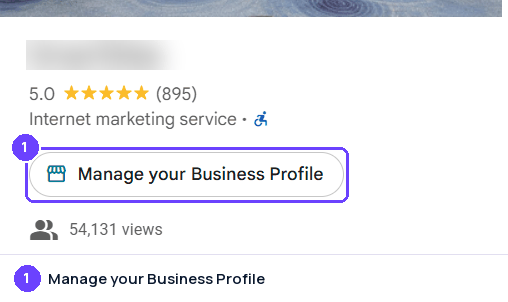
Step 1Signed in to the managing account, Maps shows Manage your Business Profile. Captured October 28, 2026 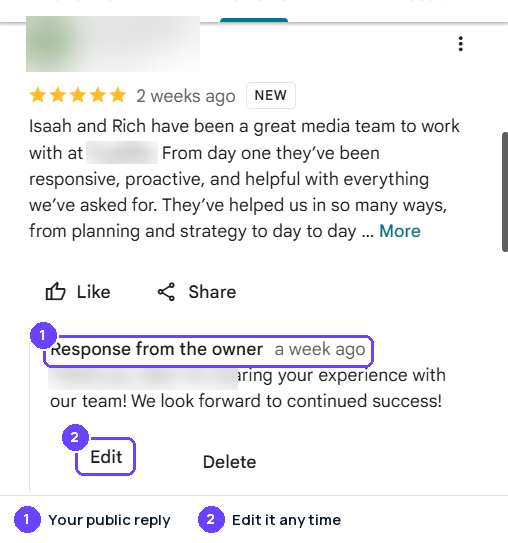
Step 2A published reply shows as Response from the owner, with Edit and Delete. Captured October 28, 2026
Captured on October 28, 2026; the site's screens may have changed since. Names of other people and businesses are blurred.
Review rules
In our own words. The official page is the rule that applies.
- Reviews must reflect a genuine experience. Fake reviews, reviews paid for directly or in kind, and content that one person posts (or has others post) from multiple accounts are removed.
- Offering incentives such as payment, discounts or free goods or services for posting a review, or for changing or removing a negative one, is prohibited.
- Businesses may not discourage negative reviews or ask only happy customers for reviews. They may invite genuine reviews, but should not require or pressure customers to review while on the premises or ask for specific content.
- Reviews based on a conflict of interest, such as by current or former employees, contractors, competitors or family members, are not allowed.
- Reviews should be about the reviewer's own experience at the place. General, political or social commentary and personal rants are not allowed.
- Harassment, threats, attacks on others, unsubstantiated accusations of criminal or unethical conduct, and profanity used to offend or emphasize criticism are not allowed. Respectful accounts of negative experiences are allowed.
- Reviews may not contain promotional content, contact details such as email addresses or phone numbers, social media links, or links to other sites.
- Posting someone's personal information without consent is prohibited.
- If one part of a post breaks the policy, Google generally removes the whole post.
Reporting a review
Google Business Profile's own process, step by step.
- Only reviews that violate Google's policies are eligible for removal. Disagreeing with or disliking a review is not grounds for a report.
- In the Business Profile: go to Read reviews, select Report next to the review, choose a reason and select Send report.
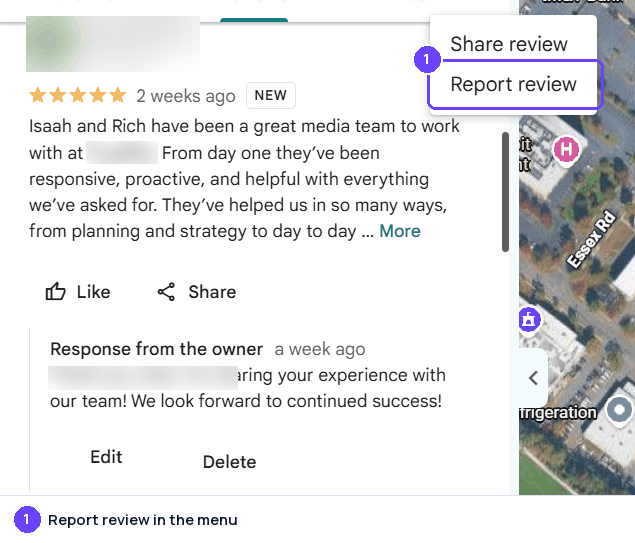
- On Google Maps you can also open the review's three-dot menu and choose Report review. The reasons are Low quality information, Profanity, Harmful, Bullying or harassment, Discrimination or hate speech, Personal information and Not helpful, plus a Report a legal issue link.
- Alternatively, use Google's Reviews Management Tool: confirm the account, select the business, choose Report a new review for removal, select Report next to the review, pick a reason and submit.
- Evaluation typically takes several days. Status in the Reviews Management Tool is Decision pending, Report reviewed - no policy violation, or Escalated - check your email for updates.
- If a reported review was found not to violate policy, a one-time appeal is available in the Reviews Management Tool: choose Check the status of a review I reported previously and appeal options, then Appeal eligible reviews (up to 10 at a time), and submit the form.
- Google emails the appeal result. If the review violates policy it is removed; otherwise it stays live.
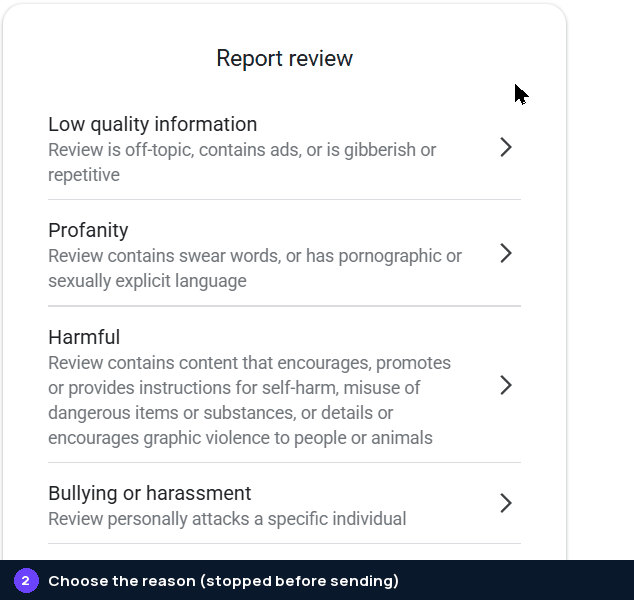
Step 1The review's menu has Report review. Captured October 28, 2026 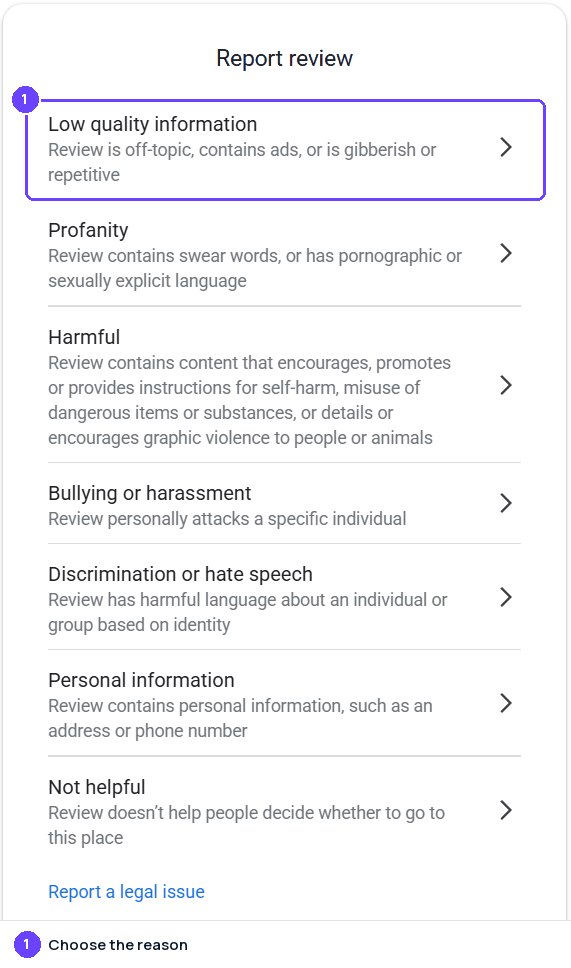
Step 2Choose the reason that matches the policy the review breaks. Captured October 28, 2026
Captured on October 28, 2026; the site's screens may have changed since. Names of other people and businesses are blurred.
Google Reviews Widget
Show your Google reviews on your own website, updated by themselves. Connect Google in Grades.com, then copy a widget from Review Marketing in your dashboard with Google as the only site (sites="google"). On WordPress, use [grades_widget preset="carousel" theme="light" accent="#6b42fe" sites="google"].
<script src="https://app.grades.com/embed/widget.js" data-widget="carousel" data-key="gk_pub_YOUR_KEY" data-theme="light" data-accent="#6b42fe" data-sites="google" async></script>
 GoogleReviews on grades.comGoogle
Quick to answer and easy to work with. They did exactly what they promised, on time.
GoogleFriendly people and a fair price. I would happily go back and recommend them.
GoogleThey explained every step and followed up afterwards. A great experience.
Tips
- Reply promptly and add a personal sign-off with a name or initials, as Google suggests.
- Keep replies short, polite and specific to the review rather than copy-pasted.
- For complicated problems, invite the customer to continue by phone or email.
- Do not offer discounts or freebies in return for reviews.
- Do not discourage negative reviews. Google notes that a blend of good and bad reviews tends to come across as more trustworthy.
- Report only reviews that actually break Google's content policies.
Sources
Last checked October 22, 2026. Site rules change; the official pages are the final word.
- https://business.google.com/us/business-profile/
- https://support.google.com/business/answer/2911778
- https://support.google.com/business/answer/7107242
- https://support.google.com/business/answer/3474050?hl=en
- https://support.google.com/business/answer/3474122
- https://support.google.com/business/answer/4596773
- https://support.google.com/contributionpolicy/answer/7400114
- https://support.google.com/contributionpolicy/answer/7422880?hl=en
About the numbers
- AI citations: the share of answers from AI assistants that cite a page on business.google.com, out of 23,227 answers in the last 90 days, to questions about the businesses in our directory ("what do customers say about ...") and to category questions ("best dentist in ..."). Search-result and help pages on a review site are not counted. As of October 30, 2026. ↩
- Cited by AI, by industry: for each industry (a directory category, or the national brands filed under an industry such as e-commerce), the share of AI answers about businesses in that industry that cite a page on business.google.com; n is the number of answers in that industry (last 90 days; only industries with at least 20 answers). As of October 30, 2026. ↩
- Has a profile, by industry: the share of the businesses we checked in each industry that have a Google Business Profile; n is the number of businesses checked in that industry. As of October 30, 2026. ↩
- States: the share of the businesses we checked in each state that have a Google Business Profile. States with too few businesses for a stable number are marked "small sample" and are not ranked; when every state is a small sample, none is shown. As of October 30, 2026. ↩
- Typical rating: the mean star rating of the Google Business Profile reviews we collected for the businesses we checked (5,413 reviews). As of October 30, 2026. ↩
- Reply rate: the share of the Google Business Profile reviews we collected that show a public reply from the business, and the median time between the review and the reply (1,032,728 reviews). As of October 30, 2026. ↩
- Site reach: the estimated monthly organic search visits to business.google.com (DataForSEO Labs) and its Domain Rating (Ahrefs, 0 to 100). These are third-party estimates for the whole domain, not figures from Google Business Profile. As of October 2026. ↩
How these numbers are collected: how we measure.