

Who uses Healthgrades
Physicians, practices and other healthcare providers are listed. Patients leave reviews for a practice they or a family member had contact with, and can add their name, city and state or stay anonymous.
Claim your profile
- On the provider's profile, answer the banner "Are you a healthcare professional?" with Yes, Claim your profile, or use the "Claim Your Free Profile" link under For Providers.
- On the Find Your Profile tab, enter the location and the medical professional's name and choose Find Your Profile. Healthgrades asks for a DEA or state license number to verify you; only the physician or an authorized representative may manage a profile.
- Sign in to Healthgrades for Professionals to update the profile and see the reviews left on Healthgrades.com.
- Once claimed, add details such as a bio and care philosophy, photos, accepted insurance plans and location information, and keep areas of expertise, conditions treated and procedures performed up to date.
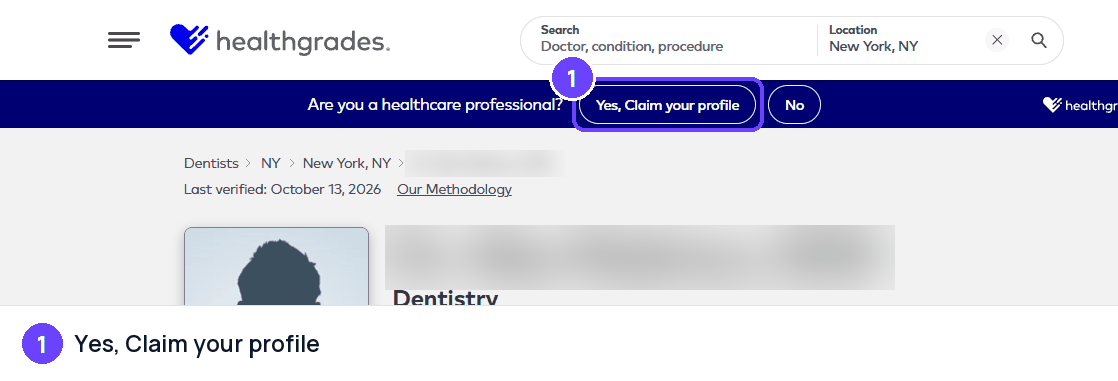
Step 1The claim banner at the top of every provider profile. Captured October 28, 2026 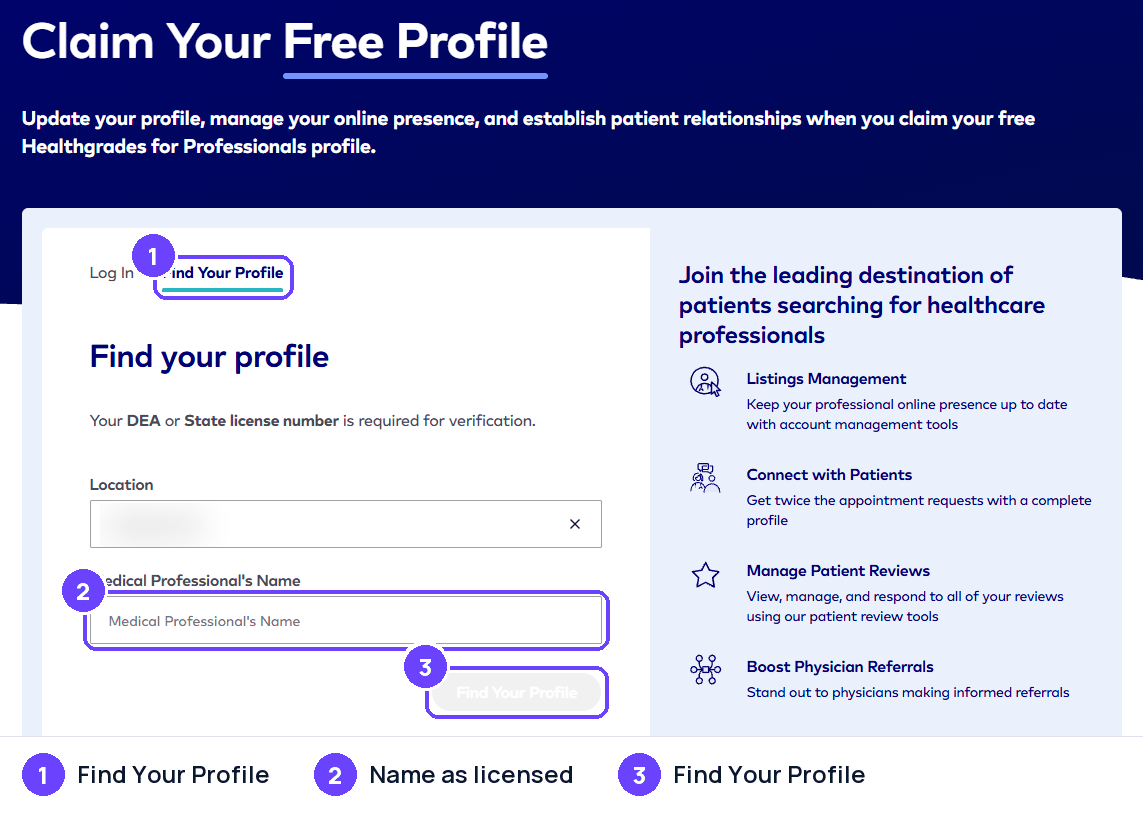
Step 2Find your profile by location and name; a DEA or state license number verifies you. Captured October 28, 2026
Captured on October 28, 2026; the site's screens may have changed since. Names of other people and businesses are blurred.
Replying to reviews
Healthgrades emails physicians when they have a new review so they can reply, and registered providers can sign in to Healthgrades for Professionals to see their reviews. Healthgrades displays the number of responses to its provider reviews.
- Healthgrades' own guidance for providers says a public reply should not confirm or discuss care details, even when the patient shared them first.
- The same guidance recommends keeping public replies general and moving specifics to a private channel such as a phone number or email.
- Providers are advised not to ask patients to remove their reviews.
- Healthgrades states that doctors cannot pay for good reviews or pay to have negative reviews removed.
Review rules
In our own words. The official page is the rule that applies.
- Reviews should come from a person (or a family member) who has had contact with the practice, and the recommendation question must be answered.
- Content such as profanity, harassment, threats, defamatory or misleading statements, and intolerance toward protected groups is not allowed.
- Phone numbers, email addresses, mailing addresses, full names and personal website links must not appear.
- Mentions or endorsements of specific brands (including pharmaceuticals) and references to legal matters are not allowed.
- Reviewers must confirm their submission through an automated email or text message. Only one review per provider is kept: a new review from the same user replaces the earlier one.
- Healthgrades does not edit or medically review reviews for medical accuracy. It checks them against its business and privacy rules and may reject or remove content.
Reporting a review
Healthgrades's own process, step by step.
- Open the review on the provider's profile and click Flag at the top right of the review.
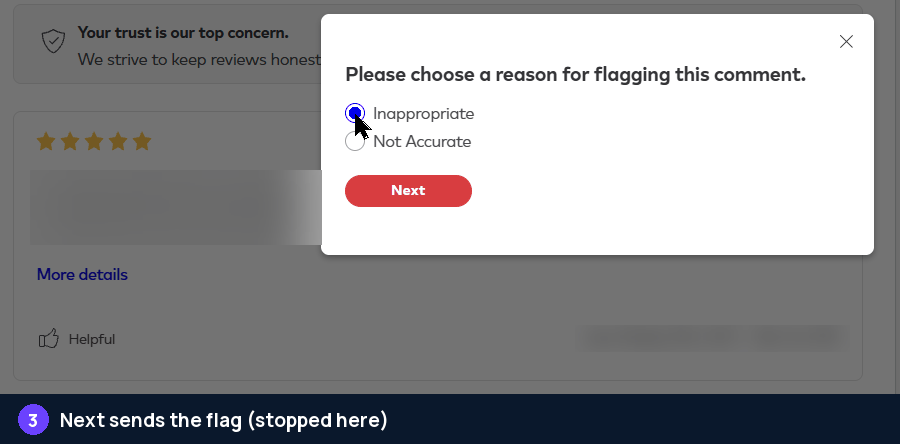
- In the dialog "Please choose a reason for flagging this comment", choose Inappropriate or Not Accurate.
- Click Next. Next sends the flag right away; there is no separate review step.
- The customer service team is notified and reviews the flagged comment against the review guidelines.
- Healthgrades states that fraudulent reviews are removed and that providers cannot pay to have negative reviews removed.
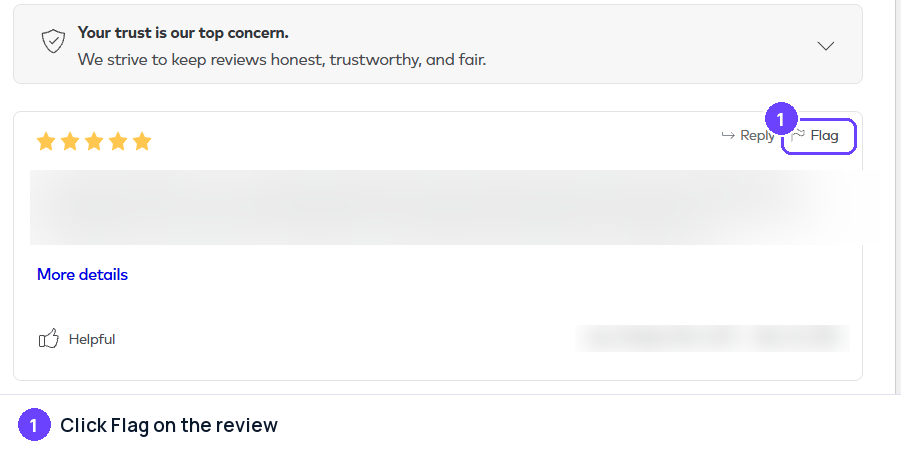
Step 1Flag sits at the top right of every review, next to Reply. Captured October 28, 2026 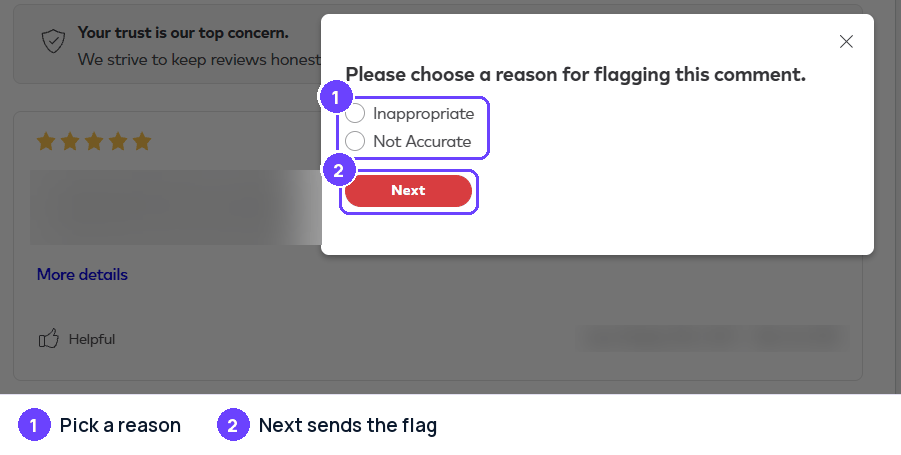
Step 2Pick one of the two reasons. Captured October 28, 2026 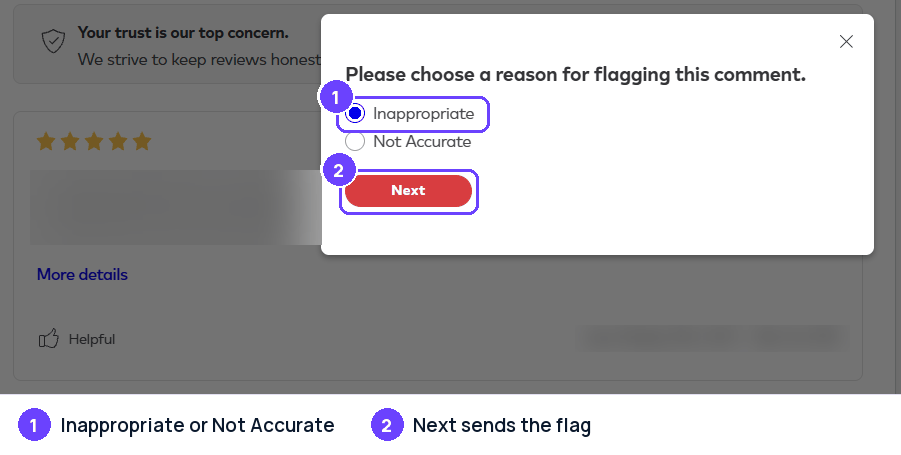
Step 3Next sends the flag at once; we stopped here. Captured October 28, 2026
Captured on October 28, 2026; the site's screens may have changed since. Names of other people and businesses are blurred.
Healthgrades Reviews Widget
Show your Healthgrades reviews on your own website, updated by themselves. Connect Healthgrades in Grades.com, then copy a widget from Review Marketing in your dashboard with Healthgrades as the only site (sites="healthgrades"). On WordPress, use [grades_widget preset="carousel" theme="light" accent="#6b42fe" sites="healthgrades"].
<script src="https://app.grades.com/embed/widget.js" data-widget="carousel" data-key="gk_pub_YOUR_KEY" data-theme="light" data-accent="#6b42fe" data-sites="healthgrades" async></script>
 HealthgradesReviews on grades.comHealthgrades
Quick to answer and easy to work with. They did exactly what they promised, on time.
HealthgradesFriendly people and a fair price. I would happily go back and recommend them.
HealthgradesThey explained every step and followed up afterwards. A great experience.
Tips
- Claim the profile and keep the bio, photos, insurance and location details accurate and current.
- Reply to reviews promptly and politely, thank the reviewer, and keep specifics out of the public reply.
- Offer a private way to follow up (phone or email) instead of debating details in public.
- Never pay for, fake or pressure patients into writing or removing reviews.
- Use patterns in feedback, such as scheduling or wait times, to improve the practice.
Sources
Last checked October 22, 2026. Site rules change; the official pages are the final word.
- https://www.healthgrades.com/content/community-review-guidelines
- https://www.healthgrades.com/about/patient-reviews
- https://www.healthgrades.com/content/faqs
- https://www.healthgrades.com/content/editorial-policy
- https://b2b.healthgrades.com/insights/blog/how-to-stay-hipaa-compliant-when-responding-to-patient-reviews/
- https://resources.healthgrades.com/pro/video/healthgrades-101-video-library/everything-you-need-to-know-about-patient-reviews
- https://update-v2.healthgrades.com/login
About the numbers
- AI citations: the share of answers from AI assistants that cite a page on healthgrades.com, out of 23,227 answers in the last 90 days, to questions about the businesses in our directory ("what do customers say about ...") and to category questions ("best dentist in ..."). Search-result and help pages on a review site are not counted. As of October 30, 2026. ↩
- Cited by AI, by industry: for each industry (a directory category, or the national brands filed under an industry such as e-commerce), the share of AI answers about businesses in that industry that cite a page on healthgrades.com; n is the number of answers in that industry (last 90 days; only industries with at least 20 answers). As of October 30, 2026. ↩
- Has a profile, by industry: the share of the businesses we checked in each industry that have a Healthgrades profile; n is the number of businesses checked in that industry. As of October 30, 2026. ↩
- States: the share of the businesses we checked in each state that have a Healthgrades profile. States with too few businesses for a stable number are marked "small sample" and are not ranked; when every state is a small sample, none is shown. As of October 30, 2026. ↩
- Typical rating: the mean star rating of the Healthgrades reviews we collected for the businesses we checked (19 reviews). As of October 30, 2026. ↩
- Reply rate: the share of the Healthgrades reviews we collected that show a public reply from the business, and the median time between the review and the reply (61 reviews). As of October 30, 2026. ↩
- Site reach: the estimated monthly organic search visits to healthgrades.com (DataForSEO Labs) and its Domain Rating (Ahrefs, 0 to 100). These are third-party estimates for the whole domain, not figures from Healthgrades. As of October 2026. ↩
How these numbers are collected: how we measure.