

Who uses Trustpilot
Businesses of many kinds, including online and local businesses, that want to manage their Trustpilot profile and respond to reviewers. Free features come with a claimed profile, and paid plans add more tools.
Claim your profile
- Your business needs an active website, since Trustpilot requires one to collect reviews, including for small local businesses and sole proprietors.
- Go to Trustpilot Business and choose Create free account.
- Enter your business location, name and website, then your job title, annual revenue range and number of employees, then your personal details.
- Enter your email address, use the activation link Trustpilot sends, agree to the terms and complete setup.
- If the email address matches your website's domain, setup is complete. Otherwise you must verify the domain, for example by confirming a domain email, uploading an HTML file, using Google Search Console, adding a meta tag, or adding a DNS TXT record.
- Trustpilot says it never asks businesses to verify through email links or external requests, and warns that verification starts inside the platform. Treat unexpected verification emails as possible phishing.
- A claimed profile displays a Claimed label, and a profile exists on Trustpilot whether or not it has been claimed.
Replying to reviews
A claimed profile can reply publicly to reviews. Trustpilot encourages replies to answer questions, resolve problems and build trust. If a business disagrees with a review that does not break the guidelines, Trustpilot recommends replying with the business's side of the story, because it stays neutral and generally does not mediate factual disputes.
- Replies must be polite and professional. Personal information, threats or aggressive language lead to removal of the reply.
- Replies that breach the guidelines are removed, and a business that keeps posting such content is warned and can have its account access blocked.
Review rules
In our own words. The official page is the rule that applies.
- Fake reviews of any kind, including writing, requesting or encouraging them, are prohibited.
- Invitations to review must be fair and neutral: one per genuine experience, sent to everyone the same way at the same point in the customer journey.
- Offering any incentive tied to writing or editing a review, such as discounts, prize entries, refunds or freebies, is prohibited.
- Selective invitations are prohibited, such as inviting only happy customers, screening customers first, or steering unhappy ones elsewhere.
- Inviting people with a special relationship to the business, such as family, staff or shareholders, is prohibited.
- Pressuring, blackmailing or threatening reviewers to write, edit or delete reviews is prohibited.
- Collecting reviews on business-owned devices is prohibited.
- Trustpilot says payment cannot remove or lower reviews or change scores, and paying subscribers flag reviews like anyone else.
- Consequences for misuse range from warnings and account restrictions to a Consumer Warning on the profile that hides the TrustScore, and in serious cases contract termination or legal action.
Reporting a review
Trustpilot's own process, step by step.
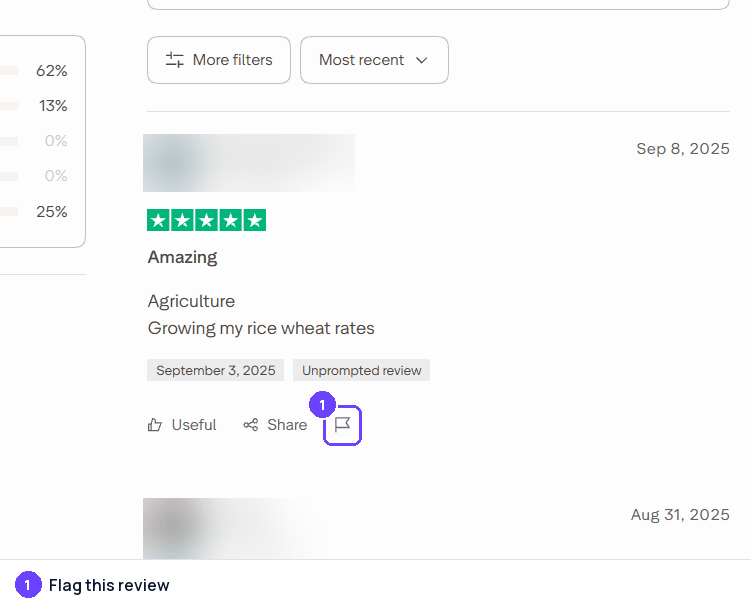
- On the public profile, the flag icon under a review opens a sign-in or guest choice, and the guest flow asks you to confirm "I'm not from" the business: it is for consumers. A business flags from its Trustpilot Business account.
- Businesses can flag a review through a business account or by contacting Trustpilot.
- Valid reasons include harmful or illegal content, personal information about others, advertising or promotion, reviews not based on a genuine experience, and reviews about a different business.
- Disliking a star rating, disagreeing with criticism, or believing a review is unfair are not valid reasons. Trustpilot notes that an expressed opinion is not defamation.
- Harmful or illegal reviews are hidden while Trustpilot investigates; most other flagged content stays visible.
- Reviewers may be asked for changes or documentation within three days, and the business is notified of the outcome.
- A business can respond to a decision by replying, and can appeal through the link in the decision email.
- Misusing the flagging tool, such as flagging too quickly or for the wrong reasons, can lead to warnings and restrictions.
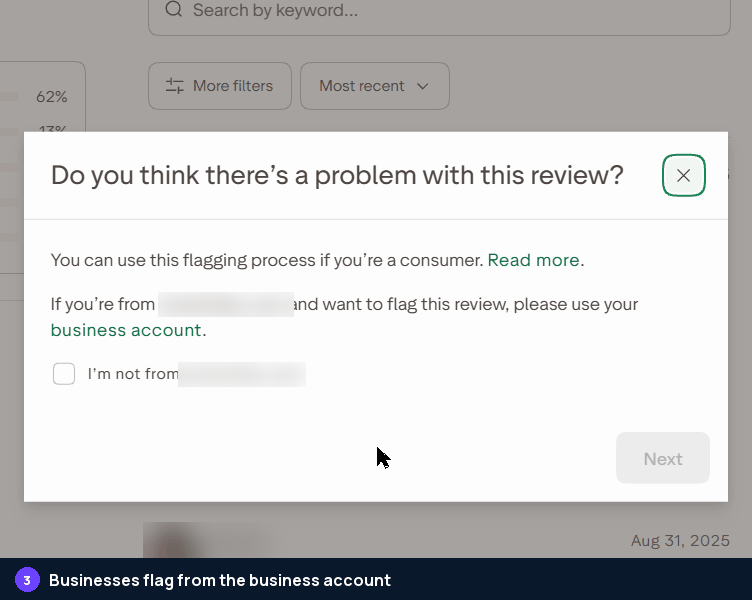
Step 1The flag icon under a review. Captured October 28, 2026 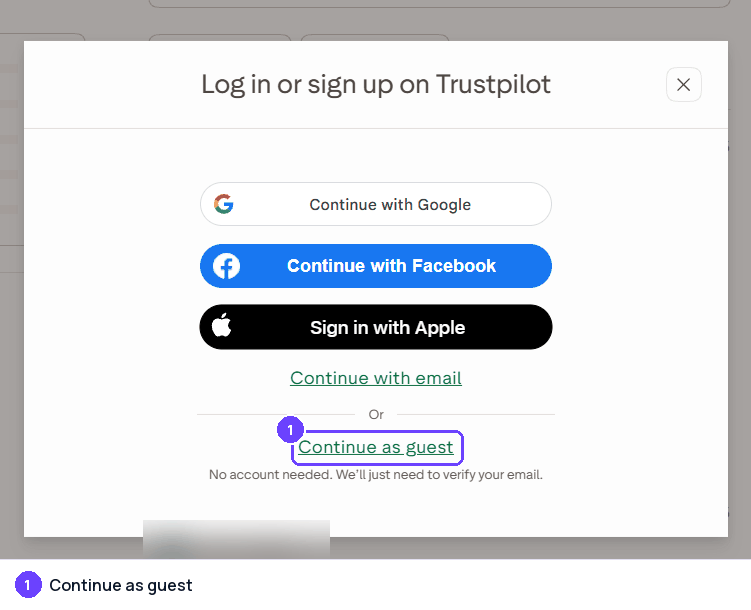
Step 2Signed out, Trustpilot asks you to log in or continue as a guest. Captured October 28, 2026 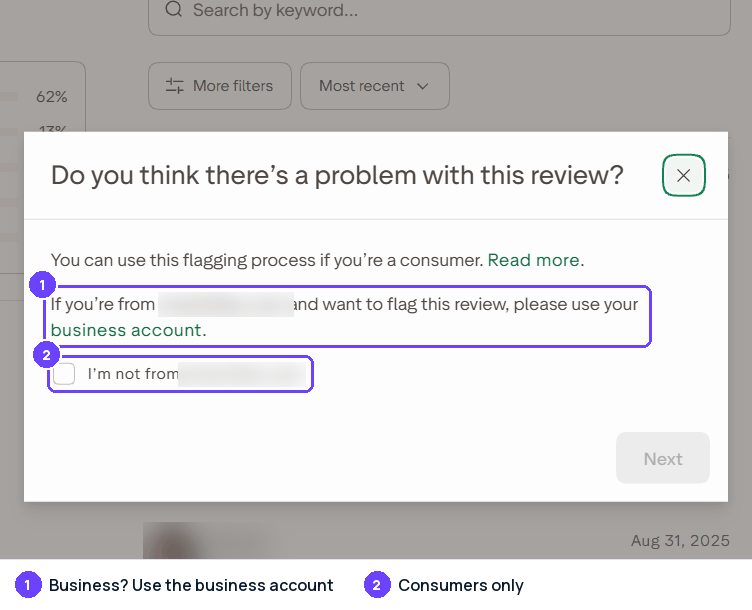
Step 3The public flag is for consumers; businesses use the business account. Captured October 28, 2026
Captured on October 28, 2026; the site's screens may have changed since. Names of other people and businesses are blurred.
Trustpilot Reviews Widget
Show your Trustpilot reviews on your own website, updated by themselves. Connect Trustpilot in Grades.com, then copy a widget from Review Marketing in your dashboard with Trustpilot as the only site (sites="trustpilot"). On WordPress, use [grades_widget preset="carousel" theme="light" accent="#6b42fe" sites="trustpilot"].
<script src="https://app.grades.com/embed/widget.js" data-widget="carousel" data-key="gk_pub_YOUR_KEY" data-theme="light" data-accent="#6b42fe" data-sites="trustpilot" async></script>
 TrustpilotReviews on grades.comTrustpilot
Quick to answer and easy to work with. They did exactly what they promised, on time.
TrustpilotFriendly people and a fair price. I would happily go back and recommend them.
TrustpilotThey explained every step and followed up afterwards. A great experience.
Tips
- Reply to reviews politely and professionally, positive and negative.
- Invite every customer the same way and at the same point, with neutral wording, and never only the happy ones.
- Do not offer discounts, refunds or freebies tied to reviews.
- Flag only reviews that actually break the guidelines, and apply the same standard to positive and negative reviews.
- Keep profile information accurate and not misleading.
Sources
Last checked October 22, 2026. Site rules change; the official pages are the final word.
- https://corporate.trustpilot.com/legal/for-businesses/guidelines-for-businesses
- https://corporate.trustpilot.com/trust/how-trustpilot-works
- https://corporate.trustpilot.com/legal/for-everyone/action-we-take/mar-2026
- https://business.trustpilot.com/
- https://help.trustpilot.com/s/article/Claim-your-business-profile?language=en_US
- https://help.trustpilot.com/s/article/Verify-your-domain?language=en_US
About the numbers
- AI citations: the share of answers from AI assistants that cite a page on trustpilot.com, out of 23,227 answers in the last 90 days, to questions about the businesses in our directory ("what do customers say about ...") and to category questions ("best dentist in ..."). Search-result and help pages on a review site are not counted. As of October 30, 2026. ↩
- Cited by AI, by industry: for each industry (a directory category, or the national brands filed under an industry such as e-commerce), the share of AI answers about businesses in that industry that cite a page on trustpilot.com; n is the number of answers in that industry (last 90 days; only industries with at least 20 answers). As of October 30, 2026. ↩
- Has a profile, by industry: the share of the businesses we checked in each industry that have a Trustpilot profile; n is the number of businesses checked in that industry. As of October 30, 2026. ↩
- States: the share of the businesses we checked in each state that have a Trustpilot profile. States with too few businesses for a stable number are marked "small sample" and are not ranked; when every state is a small sample, none is shown. As of October 30, 2026. ↩
- Typical rating: the mean star rating of the Trustpilot reviews we collected for the businesses we checked (81 reviews). As of October 30, 2026. ↩
- Reply rate: the share of the Trustpilot reviews we collected that show a public reply from the business, and the median time between the review and the reply (9,113 reviews). As of October 30, 2026. ↩
- Site reach: the estimated monthly organic search visits to trustpilot.com (DataForSEO Labs) and its Domain Rating (Ahrefs, 0 to 100). These are third-party estimates for the whole domain, not figures from Trustpilot. As of October 2026. ↩
How these numbers are collected: how we measure.