

Who uses DealerRater
Car dealerships (sales and service departments) and the shoppers who research them. Dealer staff with administrator access can reply to reviews, update the listing, and add employee listings; consumers rate the dealership and individual employees.
Claim your profile
- Dealerships can claim their listing through DealerRater's Basic Listing access, which unlocks public replies, listing edits, and employee tagging. The help center does not spell out the claiming steps; it offers a Contact us link for questions.
- Once you have a Dealer Panel login with administrator access, open the Profile menu in the header and choose Dealer Info.
- Review and correct the address, phone numbers, website, and hours.
- Add employee listings so reviewers can tag the staff they worked with.
Replying to reviews
Log in to the Dealer Panel using an admin-level account, open the Reviews tab in the header, and choose All Reviews. At the bottom of a DealerRater review you can post a public reply (shown beneath the review on your dealer page) or a private reply to the reviewer. DealerRater says a public reply is the right choice in most cases, and a private reply is useful for getting more feedback and resolving the issue.
- Replying requires a Dealer Panel account with admin access.
- Response templates are available in the help center for dealers who want a starting point.
- For a negative review, DealerRater recommends trying a private reply first, then posting a public reply if the issue is not resolved, keeping the general reader in mind.
- After an issue is resolved, the dealership can request a review update from the customer.
- The same All Reviews page lets you reply to Cars.com, Facebook, and Google reviews.
- The community guidelines say posting of a review may be delayed so that a certified dealer can respond to the author first.
Review rules
In our own words. The official page is the rule that applies.
- Reviews must describe the reviewer's own experience with the dealership and be at least 15 words.
- Only one review is accepted per dealership experience, and the experience must be within the past 12 months.
- Reviewers must write from their own personal device, not one owned or provided by the business, and must write the review themselves (DealerRater allows caretakers or immediate family to post for someone who cannot).
- Dealership employees, their immediate family, and anyone with a conflict of interest may not review; DealerRater's reporting help also describes a five-year look-back for people affiliated with a dealership or manufacturer.
- Not allowed: obscenities, discriminatory language, harassment, threats, defamatory content, language encouraging illegal activity, ads or spam, links, and contact details such as emails, phone numbers, or addresses.
- DealerRater says it may remove or modify reviews and may ban authors, and that reviews are the opinions of the individual posters.
- To publish, a reviewer enters an email and screen name, then activates the review from the email invite; the email is not shown publicly or shared with the dealership.
Reporting a review
DealerRater's own process, step by step.
- Sign in to the Dealer Panel with an account that has administrative access for the dealership: choose Dealer Log In in the header of dealerrater.com. Sign-in is shared with Cars.com and Dealer Inspire.
- Open the Reviews tab in the header and select All Reviews.
- Scroll to the review in question and click report.
- Choose a reason from the dropdown. The documented reasons are Duplicate Review, Former Employee, Fraudulent Review, Incorrect Dealer, and Other, and each one asks for specific supporting details.
- Fill in the required fields and submit; the request goes to the DealerRater Moderation Team. The help page does not state a response time or the possible outcomes.
- If a dealership changed owners, reviews of the prior owner can be addressed separately: email documentation of the ownership change date (for example a dealer license, purchase agreement, or a dated public report) to DealerRater at the address given on the help page.

Step 1Dealer Log In is in the blue bar under the header. Captured October 28, 2026 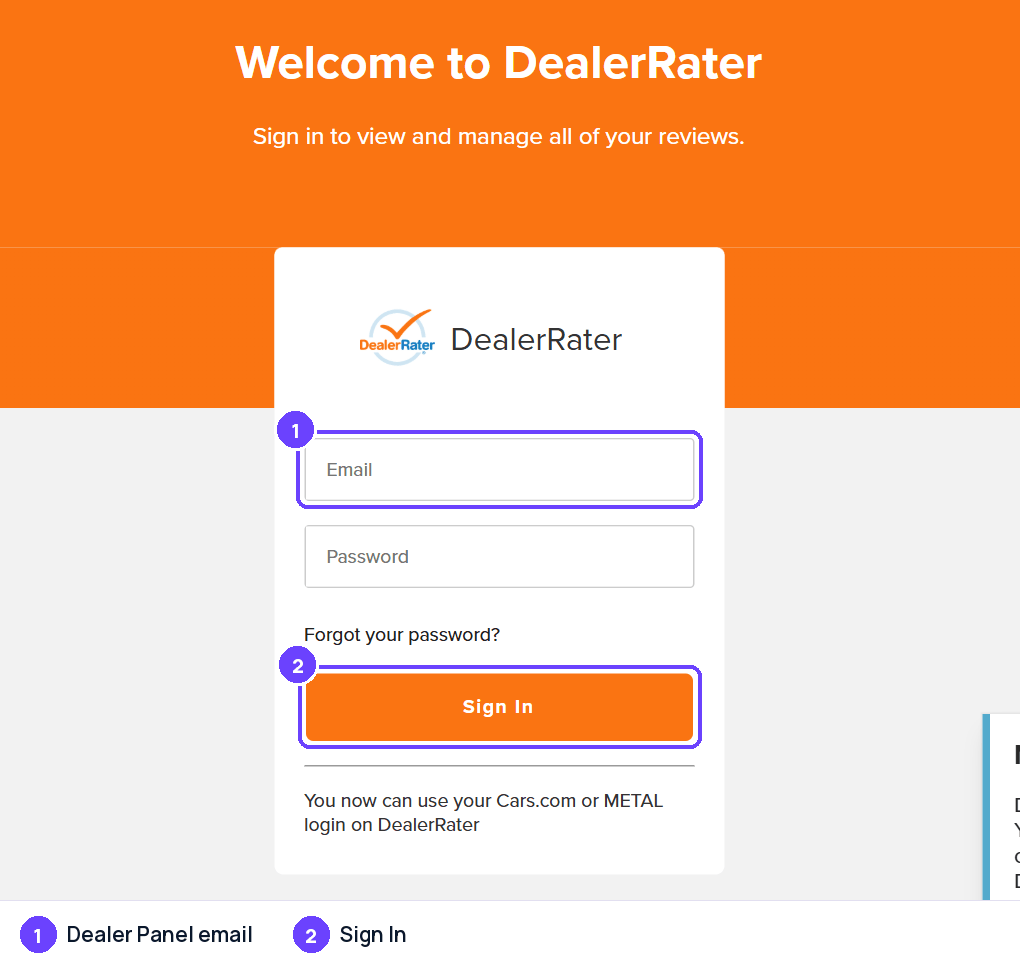
Step 2Sign in; reporting happens in the Dealer Panel under Reviews. Captured October 28, 2026
Captured on October 28, 2026; the site's screens may have changed since. Names of other people and businesses are blurred.
DealerRater Reviews Widget
Show your DealerRater reviews on your own website, updated by themselves. Connect DealerRater in Grades.com, then copy a widget from Review Marketing in your dashboard with DealerRater as the only site (sites="dealerrater"). On WordPress, use [grades_widget preset="carousel" theme="light" accent="#6b42fe" sites="dealerrater"].
<script src="https://app.grades.com/embed/widget.js" data-widget="carousel" data-key="gk_pub_YOUR_KEY" data-theme="light" data-accent="#6b42fe" data-sites="dealerrater" async></script>
 DealerRaterReviews on grades.comDealerRater
Quick to answer and easy to work with. They did exactly what they promised, on time.
DealerRaterFriendly people and a fair price. I would happily go back and recommend them.
DealerRaterThey explained every step and followed up afterwards. A great experience.
Tips
- Reply to reviews promptly and professionally, written for the public readers who will see the response.
- For unhappy customers, consider a private reply first to understand what went wrong and offer to fix it, as DealerRater itself suggests.
- Keep dealer info (address, phone numbers, website, hours) current in the Dealer Panel.
- Add current employees so customers can tag them in reviews.
- Do not write reviews for your own dealership; DealerRater's help materials treat dealer-written reviews meant to change a score as fraudulent.
- Follow DealerRater's Terms of Use and Community Guidelines in anything you submit.
Sources
Last checked October 22, 2026. Site rules change; the official pages are the final word.
- https://help.dealerrater.com/kb/en
- https://help.dealerrater.com/kb/guide/en/how-to-respond-to-reviews-hq4X6MiDvq/Steps
- https://help.dealerrater.com/kb/guide/en/how-to-handle-a-negative-review-clK3bzczKV/Steps
- https://help.dealerrater.com/kb/guide/en/how-to-report-a-review-vj7Ptp4mM6/Steps
- https://help.dealerrater.com/kb/guide/en/reasons-to-report-a-review-KsgzTLdClA/Steps/2208438
- https://help.dealerrater.com/kb/guide/en/how-to-write-a-dealerrater-review-iRzQq416BD/Steps/2727498
- https://help.dealerrater.com/kb/guide/en/why-does-cars-com-and-dealerrater-com-require-15-words-to-submit-a-review-0eNQ1KIjoq/Steps/2732030
- https://help.dealerrater.com/kb/guide/en/basic-listing-package-HeKho4dRUV/Steps/2401130
- https://help.dealerrater.com/kb/guide/en/how-to-update-dealer-info-ee1Klj07dz/Steps/2082360
- https://help.dealerrater.com/kb/guide/en/how-to-remove-reviews-from-previous-ownership-0GcpRlMYpT/Steps/2558600
- https://www.dealerrater.com/info/community/
About the numbers
- AI citations: the share of answers from AI assistants that cite a page on dealerrater.com, out of 23,227 answers in the last 90 days, to questions about the businesses in our directory ("what do customers say about ...") and to category questions ("best dentist in ..."). Search-result and help pages on a review site are not counted. As of October 30, 2026. ↩
- Cited by AI, by industry: for each industry (a directory category, or the national brands filed under an industry such as e-commerce), the share of AI answers about businesses in that industry that cite a page on dealerrater.com; n is the number of answers in that industry (last 90 days; only industries with at least 20 answers). As of October 30, 2026. ↩
- Has a profile, by industry: the share of the businesses we checked in each industry that have a DealerRater profile; n is the number of businesses checked in that industry. As of October 30, 2026. ↩
- States: the share of the businesses we checked in each state that have a DealerRater profile. States with too few businesses for a stable number are marked "small sample" and are not ranked; when every state is a small sample, none is shown. As of October 30, 2026. ↩
- Typical rating: the mean star rating of the DealerRater reviews we collected for the businesses we checked (441 reviews). As of October 30, 2026. ↩
- Reply rate: the share of the DealerRater reviews we collected that show a public reply from the business, and the median time between the review and the reply (18,658 reviews). As of October 30, 2026. ↩
- Site reach: the estimated monthly organic search visits to dealerrater.com (DataForSEO Labs) and its Domain Rating (Ahrefs, 0 to 100). These are third-party estimates for the whole domain, not figures from DealerRater. As of October 2026. ↩
How these numbers are collected: how we measure.